
Dynamic Scopes in IBM API Connect – Native OAuth & Advanced Scope Check
In standard OAuth 2.0 implementations, scopes are static strings pre-registered in the Authorization Server (for example: read, write, accounts, payments).
However, modern enterprise APIs—especially in Open Banking (PSD2 / FAPI), Healthcare (HL7 FHIR), and Multi-Tenant SaaS platforms—frequently require dynamic, parameterized scopes bound to specific resources, consent IDs, account numbers, or transaction boundaries (such as consent:3f7a9c21-8e54-4b12-98e3-d14f7b28a9c0 or account:12345:read).
This post explains how dynamic scopes work in IBM API Connect (APIC):
- What dynamic scopes are, the
*naming convention, and key architectural use cases. - How Third-Party OAuth handles dynamic scopes using placeholder matching (
consent:*). - How to adapt this pattern to APIC’s Native OAuth Provider using the “Advanced scope check before token generation” hook plus a small change in the provider assembly.
- The end-to-end request lifecycle and sequence diagram on the DataPower API Gateway.
- A tested implementation (assets in
assets/) with OpenAPI definitions, GatewayScript logic, APIC OAuth Provider settings, a deployment procedure and a test script.
Tested. The native provider part was deployed and tested on an API Connect v12 DataPower API Gateway with the
client_credentialsgrant. The first version of this post contained several definitions that do not work as written, they are corrected below and listed in Section 10. The Authorization Code flow was not tested.
1. What Are Dynamic Scopes and Why Use Them?
Static vs Dynamic Scopes
| Attribute | Static Scopes | Dynamic (Parameterized) Scopes |
|---|---|---|
| Definition | Fixed, predefined strings registered at design time | Structured string templates parameterized at runtime |
| Examples | read, write, payments, openid |
consent:3f7a9c21-8e54-4b12-98e3-d14f7b28a9c0, account:ACC-98765:view |
| Cardinality | Low (tens of scopes per organization) | Infinite (unique per consent, customer, account, or transaction) |
| Enforcement | Binary (client has scope or does not) | Contextual (client has permission only for the embedded resource ID) |
| Standardization | OAuth 2.0 (RFC 6749) | Open Banking UK / Berlin Group / FAPI / OAuth 2.0 Rich Authorization Requests (RAR - RFC 9396) |
Why Use * (e.g. consent:*) in Scope Definitions?
In the OAuth 2.0 specification (RFC 6749), scopes are defined as opaque, space-delimited strings; the core standard does not mandate a specific wildcard format like *.
However, using a wildcard suffix such as consent:* is a recognized industry naming convention adopted in Open Banking frameworks (such as the Berlin Group NextGenPSD2 and UK Open Banking) as well as healthcare interoperability standards like HL7 FHIR SMART on FHIR to visually signal that an endpoint expects a dynamic, parameterized scope.
In IBM API Connect, defining consent:* applies to both Third-Party and Native OAuth providers and serves two critical purposes:
- API Definition & Documentation: It makes it explicit in OpenAPI specifications and the Developer Portal that any sub-scope belonging to the
consent:namespace is permitted. - APIC Publish Validation Rule: API Connect enforces strict integrity checks during deployment. APIC will not allow you to deploy or publish an API requiring
consent:*in its security scheme unless that exact scope name is explicitly registered in the scopes list of the referenced OAuth Provider.
Configuring Scopes in OpenAPI: AND vs OR Logic
When securing an API in OpenAPI (Swagger), you define how required scopes must be matched against the scopes in the validated token:
-
Logical AND (all scopes required): Specify multiple scopes within the same security requirement array:
security:
  - oauth-provider:
      - 'account:read'
      - 'consent:*'
. (The token must contain both
account:readANDconsent:*). -
Logical OR (any one scope required): Specify separate security requirement objects in the
securitylist:security: - oauth-provider: - 'consent' - oauth-provider: - 'consent:*'.
(The token is accepted if it contains eitherconsentORconsent:*).
Real-World Use Cases
- Open Banking & PSD2 Consent Delegation:
When an Account Information Service Provider (AISP) or Payment Initiation Service Provider (PISP) initiates a request, the token must be constrained to the specific consent object approved by the PSU (Payment Services User):
scope=consent:3f7a9c21-8e54-4b12-98e3-d14f7b28a9c0 - Account-Level Granular Access:
Allowing a third-party app to access only a single bank account among many owned by the user:
scope=accounts:IBAN-LU280019400644750000:read - Transaction-Bounded Authorizations:
Embedding payment intent parameters into short-lived tokens:
scope=payment:eur:max_amount_500:ref_TX99823 - Healthcare (HL7 FHIR):
Restricting clinical application access to a specific patient context:
scope=patient:1048291:read - Multi-Tenant SaaS:
Isolating tenant administrators to their specific organization partition:
scope=tenant:org_904b3d13:manage
2. Dynamic Scopes with Third-Party OAuth Provider (consent:*)
When using a Third-Party OAuth Provider in API Connect, token issuance and user authentication are handled by an external Identity Provider (IdP) such as Keycloak, Okta, PingFederate, or Auth0.
In this setup, APIC acts as the Resource Server and verifies tokens via token introspection (RFC 7662) or JWT signature verification.
How Scope Validation Works During Introspection
When a client sends a request to a protected API:
- Client Request: The client presents an access token containing the dynamic scope
consent:3f7a9c21-8e54-4b12-98e3-d14f7b28a9c0. - Gateway Interception: APIC intercepts the request and issues an HTTP
POSTto the configuredintrospection_endpoint. - The Scope Mismatch Problem: The API definition requires scope
consent:*. However, the raw token issued by the external IdP contains the dynamic UUIDconsent:3f7a9c21-8e54-4b12-98e3-d14f7b28a9c0, which literally does not matchconsent:*. - Introspection Modification (Scope Enrichment): Because the Introspection API is called before APIC performs scope validation, the introspection service can validate the dynamic UUID (and perform additional security checks such as verifying if the client
azpis authorized for this recipient/UUID) and return an RFC 7662 response that appendsconsent:*:// Inside Custom Introspection GatewayScript: var dynScope = "consent:3f7a9c21-8e54-4b12-98e3-d14f7b28a9c0 consent:*"; context.message.body.write(JSON.stringify({ active: true, client_id: azp, scope: dynScope, ... })); // context.set('message.body', ...) does not write the body, see Section 10 - APIC Scope Evaluation Rule: APIC receives
{ active: true, scope: "consent:3f7a9c21-... consent:*" }. According to APIC’s security engine, an API call is granted if all scopes required by the API are present in the token’s scope list. Additional scopes in the token are allowed. Sinceconsent:*is present, the request is approved!
Third-Party Provider Configuration
Here is how the Third-Party OAuth Provider resource is configured in API Connect:
{
  "type": "oauth_provider",
  "name": "third-party-oauth",
  "title": "Third-Party OAuth Provider",
  "provider_type": "third_party",
  "scopes": {
    "consent": "Static base namespace",
    "consent:*": "Dynamic scope placeholder for consent:<uuid>"
  },
  "grants": [
    "access_code"
  ],
  "third_party_config": {
    "token_validation_requirement": "active",
    "introspection_endpoint": {
      "endpoint": "https://<gw-host>/<org>/<catalog>/oauth/introspect"
    },
    "authorize_endpoint": "https://idp.example.com/realms/consumers/protocol/openid-connect/auth",
    "token_endpoint": "https://idp.example.com/realms/consumers/protocol/openid-connect/token"
  }
}
Detailed Sequence Diagram
sequenceDiagram
    autonumber
    actor Client as Client Application
    participant GW as API Connect Gateway
    participant Introspect as Custom Introspection API (/oauth/introspect)
    participant Registry as UUID / Recipient Registry
    participant API as Protected Backend API

    Client->>GW: 1. POST /api/data (Bearer <token with scope "consent:<uuid>">)
    GW->>Introspect: 2. POST /oauth/introspect (token=...)
    Introspect->>Introspect: 3. Validate JWT signature & exp
    Introspect->>Registry: 4. Check if UUID is authorized for client_id (azp)
    Registry-->>Introspect: 5. Authorized: true
    Note over Introspect: 6. Enrich scopes:<br/>scope = "consent:<uuid> consent:*"
    Introspect-->>GW: 7. 200 OK { active: true, scope: "consent:<uuid> consent:*" }
    GW->>GW: 8. Verify required scope "consent:*" is present in returned scopes -> PASS
    GW->>API: 9. Forward Request
    API-->>GW: 10. Response
    GW-->>Client: 11. Response
3. Adapting Dynamic Scopes to APIC Native OAuth Provider
When using API Connect as the Native OAuth Provider (Authorization Server), the gateway issues, signs, and manages the token lifecycle directly.
The Native OAuth Challenge
By default, APIC’s Native OAuth engine strictly validates requested scopes against the static scopes defined in the OAuth Provider resource.
Requests with scopes that are not defined in the OAuth Provider resource will be rejected by default.
If an application requests scope=consent:3f7a9c21-8e54-4b12-98e3-d14f7b28a9c0, APIC rejects the request immediately with:
{
  "error": "invalid_scope",
  "error_description": "Scope is not allowed"
}
Because dynamic scope values are created at runtime, they cannot be pre-populated into APIC’s static scope table.
How to support Dynamic Scopes in Native OAuth
The Native OAuth provider compares the requested scope with its scope table and dynamic scope is therefore refused (Scope is not allowed) before the validator is ever called.
To address this issue, the following configuration has been implemented:
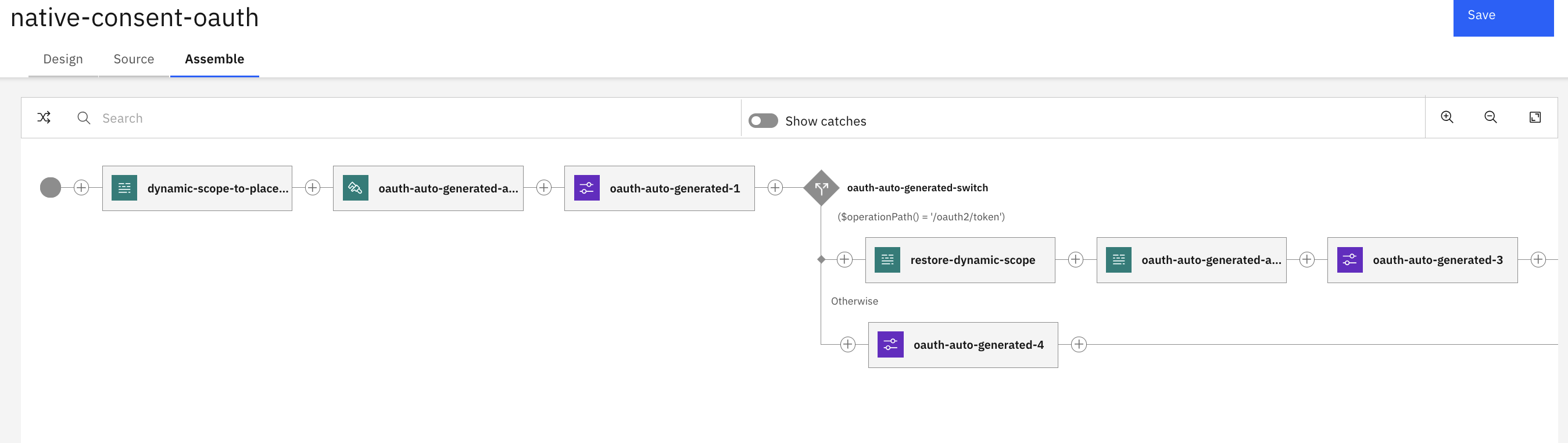
a GatewayScript (dynmamic-scope-to-place), is placed before the first OAuth policy scope validation (oauth-auto-generated-1), to remove any matching dynamic scope (f.e. consent:123) and replace by its static representation (f.e. consent:*). See Component 2. The dynamic scope is injected back by a gatewayscript (restore-dynamic-scope) before the validator scope service (oauth-auto-generated).
Scopes can be validated or injected into tokens using gatewayscript as described before or deleguated to external parties in two ways:
- “Advanced scope check before token generation” (Application scope check / Owner scope check):
- Configure Application scope check and/or Owner scope check URLs.
- After application authentication, APIC makes a back-channel HTTP
GETto the validator endpoint and passes the requested scope in thetoken_scopequery parameter. - The validator approves the dynamic scope by returning the
x-selected-scopeHTTP response header, e.g.consent:3f7a9c21-... consent:*. The header is mandatory, a body is ignored. - The dynamic scope is injected back before the token generation by the
restore-scope.jsscript that runs before the validator. - Important note The issued token must contain both the dynamic UUID and the placeholder
consent:*. This is required to allow calling the API where the scope is set as dynamicconsent:*. If the scope is not present the call will be rejected by the gateway. The called API can have an API assembly GatewayScript to validate the specific UUID if required. In the tested implementation the API service scope validator called before the token generation, acts as a gate (200 = accepted, anything else = the token request is refused)
- “Authentication URL User Registry” (
oauth_auth_url):- If user authentication is performed via an Authentication URL, the authentication service response can include the HTTP response header
x-selected-scopeto inject or override scopes embedded in the token.
- If user authentication is performed via an Authentication URL, the authentication service response can include the HTTP response header
Scope Validation at Request Time: Token Generation vs Runtime Hooks
| Approach | Where Scope is Enriched | Runtime Overhead | How APIC Validates |
|---|---|---|---|
| Token Generation Enrichment (Recommended) | During token issuance via Advanced scope check before token generation and the assembly scripts | Zero runtime overhead | Native gateway checks consent:* in Gateway Token Store; Assembly GatewayScript checks UUID. |
Advanced scope check after token validation (x-scopeValidate) |
Evaluated on every API request | Extra HTTP call per API invocation | Gateway calls the x-scopeValidate URL after verifying standard token claims. Per the IBM documentation this call is an HTTP POST with a JSON body (not tested here), unlike the before token generation check above, which is a GET. |
┌────────────────────────────────────────────────────────────────────────────┐
│    IBM API Connect Gateway - token request (client_credentials, tested)    │
│                                                                            │
│ 1. Client  POST /oauth-native/oauth2/token   scope=consent:<uuid>          │
│ 2. Script 1 (pre-oauth.js)       consent:<uuid>  ->  consent:*             │
│       the scope table check (OAuthValidateRequest) passes              │
│ 3. Script 2 (restore-scope.js)   scope = consent:<uuid> consent:*          │
│ 3. Provider  --GET /oauth/scope-check?token_scope=consent:*--> Validator   │
│ 4. Scope Validator  --200 + header x-selected-scope-->  Provider           │
│ 6. Provider issues the token with "consent:<uuid> consent:*"               │
│ 7. Protected API: OAuth check needs consent:*, assembly extracts the UUID  │
└────────────────────────────────────────────────────────────────────────────┘
End-to-End Sequence Flow
Here is the complete sequence flow using the Client Credentials Grant (client_credentials) with the internal Scope Validator and APIC Native OAuth opaque tokens:
sequenceDiagram
    autonumber
    actor Client as Client Application
    participant APIC_AS as APIC Native OAuth Provider
    participant Validator as Scope Validator API (/oauth/scope-check)
    participant EchoAPI as Protected Echo API
    participant Backend as Backend Service

    Note over Client,APIC_AS: Phase 1 — Token Request with Dynamic Scope
    Client->>APIC_AS: POST /oauth2/token<br/>grant_type=client_credentials&client_id=...&client_secret=...<br/>&scope=consent:3f7a9c21-8e54-4b12-98e3-d14f7b28a9c0

    Note over APIC_AS: Phase 2 — Pre-Validation Scope Rewriting
    APIC_AS->>APIC_AS: 1. pre-oauth.js parks consent:<uuid> in context variable "consent.requested"
    APIC_AS->>APIC_AS: 2. Sets oauth.processing.scope to placeholder "consent:*"
    APIC_AS->>APIC_AS: 3. OAuthValidateRequest validates consent:* against static scope table -> PASS

    Note over APIC_AS,Validator: Phase 3 — Back-Channel Scope Check
    APIC_AS->>APIC_AS: 4. restore-scope.js restores real dynamic scope to oauth.processing.scope
    APIC_AS->>Validator: 5. GET /scope-check?token_scope=consent:3f7a9c21-...&app_name=...&catalog=...
    Validator->>Validator: 6. Validates UUID format / permissions / registry
    Validator-->>APIC_AS: 7. 200 OK, header x-selected-scope: consent:3f7a9c21-8e54-4b12-98e3-d14f7b28a9c0 consent:*

    Note over APIC_AS,Client: Phase 4 — Token Generation & Issuance
    APIC_AS->>APIC_AS: 8. OAuthGenerateAccessToken stores approved scopes in Gateway Token Store
    APIC_AS-->>Client: 9. 200 OK { access_token: "AAMg...", scope: "consent:3f7a9c21-... consent:*", expires_in: 3600 }

    Note over Client,Backend: Phase 5 — Protected API Calls & Scope Enforcement
    Client->>EchoAPI: 10. POST /api/credential/echo (Bearer token with consent:<uuid> consent:*)
    EchoAPI->>EchoAPI: 11. Security check requires "consent:*" -> PASS
    EchoAPI->>EchoAPI: 12. Assembly extracts consentId from oauth.verified_access_token.scope
    EchoAPI->>Backend: 13. Forward request
    Backend-->>EchoAPI: 14. 200 OK
    EchoAPI-->>Client: 15. 200 OK { "consentId": "3f7a9c21-...", "echo": {...} }
4. What Needs to Be Configured: The Full Picture
To implement this architecture in API Connect, four components are configured:
- 2 APIs: one for scope validation and the other to protect the business API
- The Native OAuth Provider
- A subscription to be able to request a token
┌──────────────────────────────────────────────────────────────────────────────┐
│                              API Connect Catalog                             │
│                                                                              │
│  ┌────────────────────────────────────────────────────────────────────────┐  │
│  │ 1. Internal Scope Validator API                                        │  │
│  │    • Endpoint: GET /scope-check?token_scope=...                        │  │
│  │    • Receives query params (token_scope, app_name, org, catalog, ...)  │  │
│  │    • Regex / business check, 200 + x-selected-scope header, else 403   │  │
│  └────────────────────────────────────────────────────────────────────────┘  │
│                                      ▲                                       │
│                                      │ (Internal HTTP GET)                   │
│  ┌───────────────────────────────────┴────────────────────────────────────┐  │
│  │ 2. Native OAuth Provider Resource                                      │  │
│  │    • Scope Table: Static anchor "consent" (and "consent:*")            │  │
│  │    • Application scope check -> points to /scope-check                 │  │
│  │    • Assembly: 2 GatewayScripts (consent:<uuid> <-> consent:*)         │  │
│  │    • Grants: application (tested), access_code (not tested)            │  │
│  │    • User Security (access_code only): redirect to IdP, not tested     │  │
│  └────────────────────────────────────────────────────────────────────────┘  │
│                                      │                                       │
│                                      │ (Issues Token with dynamic scope)     │
│                                      ▼                                       │
│  ┌────────────────────────────────────────────────────────────────────────┐  │
│  │ 3. Protected Resource API (Echo API)                                   │  │
│  │    • Security Definition: references Native OAuth Provider             │  │
│  │    • Scopes: consent:* on one operation, consent on another            │  │
│  │    • Assembly: operation-switch, GatewayScript checks the UUID         │  │
│  │    • x-ibm-oauth-provider is required in the security scheme           │  │
│  └────────────────────────────────────────────────────────────────────────┘  │
│                                                                              │
│  ┌────────────────────────────────────────────────────────────────────────┐  │
│  │ 4. Product & Developer Portal Subscription                             │  │
│  │    • Package Protected API & OAuth Provider in a Product               │  │
│  │    • Consumer Application subscribes to obtain client_id & secret      │  │
│  └────────────────────────────────────────────────────────────────────────┘  │
└──────────────────────────────────────────────────────────────────────────────┘
5. Implementation & Working Examples
All assets in this section were deployed and tested on an API Connect v12 with DataPower API Gateway (dp-gw, catalog sandbox). The full, tested files are in post-assets/. Only the minimum needed to understand each object is shown here, follow the links for the complete definitions.
Everything below was tested with the client_credentials grant (application in API Connect).
| # | Object | File |
|---|---|---|
| 1 | Scope Validator API + product | oauth-scope-validator.yaml, scope-validator-product.yaml |
| 2 | Native OAuth provider (org level) | native-consent-oauth.json |
| 2b | Catalog configuration of the provider | configured-native-consent-oauth.yaml |
| 3 | Protected Echo API + product | echo-api.yaml, echo-product.yaml |
| - | GatewayScripts used by the provider | pre-oauth.js, restore-scope.js |
| - | End-to-end test script | test.sh |
Component 1 — Scope Validator API
The native provider calls this API with an HTTP GET and sends the requested scope in the token_scope query parameter (together with app_name, app_id, org, catalog, trans_id and api_scope). The answer is read from the x-selected-scope response header. The header is mandatory on a 200, otherwise the token request fails. A non-200 answer rejects the token request.
Minimum to implement:
servers:
  - url: /oauth                       # real URL: https://<gw-host>/<org>/<catalog>/oauth/scope-check
x-ibm-configuration:
  gateway: datapower-api-gateway
  assembly:
    execute:
      - gatewayscript:
          title: validate-dynamic-scope
          source: |
            var raw = context.get('request.parameters.token_scope.values[0]') || '';
            var requested = decodeURIComponent(String(raw).replace(/\+/g, ' ')).trim().split(/\s+/).filter(Boolean);
            // accept: consent | consent:<uuid> | consent:*
            // approved   -> status 200 + header  x-selected-scope: "consent:<uuid> consent:*"
            // otherwise  -> status 403
            context.set('message.headers.x-selected-scope', finalScope);   // + context.set('message.status.code', 200)
paths:
  /scope-check:
    get: { parameters: [ { name: token_scope, in: query, required: true } ] }
Full file: oauth-scope-validator.yaml. Quick check against the gateway:
curl -sk -i -G "$G/oauth/scope-check" --data-urlencode "token_scope=consent:3f7a9c21-8e54-4b12-98e3-d14f7b28a9c0"
# HTTP/2 200
# x-selected-scope: consent:3f7a9c21-8e54-4b12-98e3-d14f7b28a9c0 consent:*
Component 2 — Native OAuth Provider
Minimum to configure:
| Setting | Value |
|---|---|
| Provider type | Native, gateway version 6000 (DataPower API Gateway) |
| Scope table | consent (static anchor) and consent:* (placeholder), nothing else |
| Grants | application (client credentials) as tested. |
| Advanced scope check before token generation, Application scope check | https://<gw-host>/<org>/<catalog>/oauth/scope-check |
| Base path / token path | /oauth-native and /oauth2/token (token URL is https://<gw-host>/<org>/<catalog>/oauth-native/oauth2/token) |
In the UI: Resources > OAuth Providers > Add > Native OAuth provider, then Scopes and fill the Application scope check endpoint. The same can be done from the CLI with the exported definition: native-consent-oauth.json.
The assembly change that makes dynamic scopes work
The scope check endpoint alone is not enough. In the tests, a request for consent:<uuid> was answered with invalid_scope - "Scope is not allowed" and the validator was never called. The gateway compares the requested scope with the scope table in the first step of the provider assembly (OAuthValidateRequest), which runs before the advanced scope check.
The fix is two GatewayScript policies in the provider’s own assembly (native_provider.api, token path):
 gatewayscript  dynamic-scope-to-placeholder   <- NEW, first policy of the assembly
 oauth          OAuthValidateRequest           (scope table check)
 switch  /oauth2/token
    gatewayscript  oauth-auto-generated-advanced-scope-application   (calls the scope check URL)
    gatewayscript  restore-dynamic-scope       <- NEW, right before token generation
    oauth          OAuthGenerateAccessToken, OAuthVerifyAZCode, ...
pre-oauth.jsreplaces everyconsent:<uuid>inoauth.processing.scopeby the registeredconsent:*and keeps the original in the context variableconsent.requested. The scope table check now passes. The script defines the dynamic consent using the variable DYNAMIC_PREFIXES.DYNAMIC_PREFIXES: adapt the variable in fonction of the scopes that have been defined in the Native OAuth Provider. I ddin’t found a way to get those scopes from the definition at runtime.
restore-scope.jssetsoauth.processing.scopeback toconsent:<uuid> consent:*, so the token carries both the real UUID and the placeholder. It overwrites the value returned by the validator, which is only a gate for dynamic scopes.- The generated advanced scope check calls the Scope Validator. Which scope it sends: the generated script builds
token_scopefromoauth.processing.scope, which at this point already holds the placeholder set by step 1. Reading the script, the validator therefore receivestoken_scope=consent:* consent:<uuid>. A non-200 answer refuses the token request. On a 200 the generated script copiesx-selected-scopeintooauth.processing.scope.
// pre-oauth.js (core)
  var DYNAMIC_PREFIXES = ['consent'];
  var raw = context.get('request.parameters.scope.values[0]');
  var requested = decodeURIComponent(String(raw || '').replace(/\+/g, ' '))
    .split(/\s+/).filter(Boolean);

  var dynamicMatches = [];
  var processed = requested.map(function (s) {
    for (var i = 0; i < DYNAMIC_PREFIXES.length; i++) {
      var prefix = DYNAMIC_PREFIXES[i] + ':';
      // Matches "consent:1234", "consent:<uuid>", but not "consent" or "consent:*"
      if (s.indexOf(prefix) === 0 && s.length > prefix.length && s !== (prefix + '*')) {
        dynamicMatches.push(s);
        return prefix + '*'; // Replaces "consent:1234" with "consent:*"
      }
    }
    return s;
  });
  if (dynamicMatches.length > 0) {
    // Store original dynamic scope(s) for restoration before token generation
    context.set('consent.requested', dynamicMatches.join(' '));
    // Set placeholder scope(s) for OAuthValidateRequest
    context.set('oauth.processing.scope', processed.join(' '));
  }
The provider must then be enabled in the catalog (configured-native-consent-oauth.yaml). It only needs the oauth_provider_url of the org-level provider.
Component 3 — Protected Echo API (three operations)
One API, three operations illustrating different scope protections (including logical OR):
| Operation | Required scope | Accepts |
|---|---|---|
POST /api/credential/echo |
consent:* (dynamic) |
Tokens issued for consent:<uuid>. The assembly extracts the UUID and returns it as consentId. |
GET /api/status |
consent (static) |
Tokens issued for the plain consent scope. |
DELETE /api/credential/echo |
consent OR consent:* (dual) |
Tokens issued for either static consent OR dynamic consent:* (logical OR). |
Minimum to implement:
x-ibm-configuration:
  gateway: datapower-api-gateway
  assembly:
    execute:
      - operation-switch:                      # one policy chain per operation
          case:
            - operations: [ { verb: post, path: /api/credential/echo } ]
              execute:
                - gatewayscript: { title: enforce-dynamic-scope }   # reads oauth.verified_access_token.scope, extracts <uuid>
                - gatewayscript: { title: dynamic-backend-response }
            - operations: [ { verb: get, path: /api/status } ]
              execute:
                - gatewayscript: { title: static-backend-response }
            - operations: [ { verb: delete, path: /api/credential/echo } ]
              execute:
                - gatewayscript: { title: dual-backend-response }
paths:
  /api/credential/echo:
    post:
      security: [ { native-consent-oauth: ['consent:*'] } ]
    delete:
      security:
        - native-consent-oauth: [ consent ]
        - native-consent-oauth: [ 'consent:*' ]
  /api/status:
    get:
      security: [ { native-consent-oauth: [ consent ] } ]
components:
  securitySchemes:
    native-consent-oauth:
      type: oauth2
      x-ibm-oauth-provider: native-consent-oauth      # REQUIRED on the DataPower API Gateway
      flows:
        clientCredentials:
          tokenUrl: https://<gw-host>/<org>/<catalog>/oauth-native/oauth2/token
          scopes: { consent: Static scope, 'consent:*': Dynamic scope placeholder }
Full file: echo-api.yaml.
- On the DataPower API Gateway the validated token is read from
oauth.verified_access_token.scopeandoauth.verified_access_token.client_id.- Write bodies with
context.message.body.write(...). Usecontext.reject('Forbidden', '...')with acatchonRejectErrorto shape the 403 body.
Component 4 — Products and subscription
Both APIs are published through a product. The test application subscribes to the Echo product to obtain the client_id and client_secret used on the token endpoint. Files: scope-validator-product.yaml and echo-product.yaml. The validator product is published so the gateway exposes /oauth/scope-check. It does not need a subscription, because the provider calls it from inside the gateway.
6. Testing the Flow End-to-End
The tests below were run against a real gateway with the client_credentials grant. The whole sequence is automated in test.sh, which reads the gateway URL and the application credentials from environment variables:
export GW_BASE=https://<gw-host>/<provider-org>/<catalog>
export CLIENT_ID=<client id of the subscribed application>
export CLIENT_SECRET=<client secret>        # never commit this value
export CURL_OPTS=-k                          # only for a self-signed gateway certificate
./post-assets/test.sh
Step 1 — Request a token with a dynamic scope
curl -s -X POST "$GW_BASE/oauth-native/oauth2/token" \
  -d grant_type=client_credentials \
  -d client_id="$CLIENT_ID" -d client_secret="$CLIENT_SECRET" \
  --data-urlencode "scope=consent:3f7a9c21-8e54-4b12-98e3-d14f7b28a9c0"
{
  "token_type": "Bearer",
  "access_token": "AAMg...",
  "scope": "consent:3f7a9c21-8e54-4b12-98e3-d14f7b28a9c0 consent:*",
  "expires_in": 3600
}
The token carries the real UUID and the placeholder consent:*. A request for the static scope returns "scope": "consent".
Step 2 — Call the operation protected by the dynamic scope
curl -s -X POST "$GW_BASE/echo-dynamic/api/credential/echo" \
  -H "Authorization: Bearer $TOKEN" -H "Content-Type: application/json" -d '{"a":1}'
{
  "status": "success",
  "message": "Authorized with dynamic scope",
  "consentId": "3f7a9c21-8e54-4b12-98e3-d14f7b28a9c0",
  "client_id": "<client id>",
  "scope": "consent:3f7a9c21-8e54-4b12-98e3-d14f7b28a9c0 consent:*",
  "echo": { "a": 1 }
}
Step 3 — Call the operation protected by the static scope
curl -s "$GW_BASE/echo-dynamic/api/status" -H "Authorization: Bearer $STATIC_TOKEN"
# {"status":"success","message":"Authorized with static scope consent","scope":"consent", ...}
Step 4 — Call the operation protected by dual scope (logical OR)
DELETE /api/credential/echo accepts either token:
# With dynamic token (consent:*)
curl -s -X DELETE "$GW_BASE/echo-dynamic/api/credential/echo" -H "Authorization: Bearer $TOKEN"
# {"status":"success","message":"Authorized with dual scope (consent OR consent:*)", ...}

# With static token (consent)
curl -s -X DELETE "$GW_BASE/echo-dynamic/api/credential/echo" -H "Authorization: Bearer $STATIC_TOKEN"
# {"status":"success","message":"Authorized with dual scope (consent OR consent:*)", ...}
Step 5 — Negative tests
| Request | Result |
|---|---|
Token with scope=consent:evil (bad format) |
invalid_scope |
Token with scope=other (not registered) |
invalid_scope |
POST /api/credential/echo with the static token |
401, the token has no consent:* |
GET /api/status with the dynamic token |
401, the token has no consent |
DELETE /api/credential/echo with garbage token or no token |
401 |
| Any operation with a garbage token or no token | 401 |
Results of the test run
== 1. Scope Validator (called directly, as the provider does: GET + token_scope)
PASS  validator consent                                              200
PASS  validator consent:<uuid>                                       200
PASS  validator consent:evil                                         403
== 2. Token endpoint
PASS  token scope=consent                                            consent
PASS  token scope=consent:<uuid>                                     consent:3f7a9c21-8e54-4b12-98e3-d14f7b28a9c0 consent:*
PASS  token scope=consent:evil                                       invalid_scope
PASS  token scope=other                                              invalid_scope
== 3. Echo API
PASS  POST   /api/credential/echo  dynamic token (consent:*)         200
PASS  POST   /api/credential/echo  static token                      401
PASS  POST   /api/credential/echo  garbage token                     401
PASS  GET    /api/status           static token (consent)            200
PASS  GET    /api/status           dynamic token                     401
PASS  GET    /api/status           no token                          401
PASS  DELETE /api/credential/echo  dynamic token (consent:*)         200
PASS  DELETE /api/credential/echo  static token (consent)            200
PASS  DELETE /api/credential/echo  garbage token                     401
PASS  DELETE /api/credential/echo  no token                          401
passed=17 failed=0
Why
401and not403for a wrong scope? The gateway’s OAuth security check runs before the assembly. When the token does not contain the scope required by the operation, it answers401 invalid_token. The403written by the assembly is only reached when the token hasconsent:*but no validconsent:<uuid>.
7. Deploying the Complete Solution with the API Connect Toolkit CLI
The toolkit CLI is apic in the IBM documentation and may be installed under another name (apiccli in the test environment). The commands are identical. <mgmt> is the management endpoint host, <org> the provider organization and sandbox the catalog. The commands for validate, publish, oauth-providers:*, configured-oauth-providers:create, products:get and subscriptions:create were run as written. login, apps:create and --migrate_subscriptions come from the CLI help and were not run in the test.
export MGMT=<mgmt>            # e.g. api.<domain>
export ORG=<org>
export CAT=sandbox
FLAGS="-s $MGMT -o $ORG -c $CAT --scope catalog"      # add --insecure-skip-tls-verify for self-signed certificates

apic login --server $MGMT --realm provider/<idp-name>   # prompts for user and password
Step 1 — Publish the Scope Validator
apic validate post-assets/oauth-scope-validator.yaml
apic products:publish post-assets/scope-validator-product.yaml $FLAGS
Step 2 — Create the Native OAuth provider
The provider is created at org level, then enabled in the catalog. Two points matter:
- The provider assembly name must be
<provider-name><provider-id>, and the id only exists after creation. Create the provider first, then update it with the full definition. - Create it from the UI or from an existing complete definition. A provider created from a minimal definition has a token path that only echoes the request.
# 2a. create the provider (UI: Resources > OAuth Providers > Add > Native OAuth provider), then read its id
apic oauth-providers:get native-consent-oauth -s $MGMT -o $ORG

# 2b. update it with the tested definition: scopes consent + consent:*, application grant,
#     scope check URL, and the two GatewayScripts (pre-oauth.js, restore-scope.js).
#     Adapt the x-ibm-name and the ADVScopesApplicationUrl property to your environment first.
apic oauth-providers:update native-consent-oauth post-assets/native-consent-oauth.json -s $MGMT -o $ORG

# 2c. enable it in the catalog (oauth_provider_url must point to the org-level provider)
apic configured-oauth-providers:create post-assets/configured-native-consent-oauth.yaml $FLAGS
Step 3 — Publish the Protected Echo API
apic validate post-assets/echo-api.yaml
apic products:publish post-assets/echo-product.yaml $FLAGS
The publish fails if the OAuth provider is not yet enabled in the catalog, because the security scheme references it.
Step 4 — Create the application and subscribe
cat > app.yaml <<'YAML'
title: dyn-scope-app
name: dyn-scope-app
YAML
apic apps:create app.yaml $FLAGS --consumer-org <consumer-org>
# the client id and secret are returned when the credentials are created (apic credentials:create ... --app dyn-scope-app),
# or read them from the application in the UI
Create the subscription with the URL of the published Echo product:
apic products:get echo-dynamic-oauth-product:1.0.0 $FLAGS --fields url
cat > sub.yaml <<'YAML'
title: dyn-scope-sub
name: dyn-scope-sub
product_url: <url returned above>
plan: default
YAML
apic subscriptions:create sub.yaml $FLAGS --app dyn-scope-app --consumer-org <consumer-org>
Step 5 — Test
export GW_BASE=https://<gw-host>/$ORG/$CAT CLIENT_ID=<id> CLIENT_SECRET=<secret>
./post-assets/test.sh
Republishing a product removes its subscriptions
Publishing echo-product.yaml again creates a new product id and the subscription of the test application is dropped. The token endpoint then answers unauthorized_client (“client not subscribed to this API”). Either recreate the subscription as in Step 4, or republish with --migrate_subscriptions:
apic products:publish post-assets/echo-product.yaml $FLAGS --migrate_subscriptions
8. Resources
- OAuth 2.0 Authorization Framework (RFC 6749)
- OAuth 2.0 Rich Authorization Requests (RFC 9396)
- IBM API Connect Documentation – Configuring a Native OAuth Provider
- IBM API Connect Documentation – Advanced Scope Check
- Companion: Native OAuth Provider in IBM API Connect
- Companion: Third-Party OAuth Provider in IBM API Connect

Leave a comment